CCTC Admissions Financial Aid

Financial Aid at Cape Coral Technical College

Cape Coral Technical College do not accept federal student loans as payment.  Florida Prepaid and the Florida Bright Futures Scholarship are accepted.  The schools participate in the following financial aid programs:


Federal Pell Grant

The Federal Pell Grant is a need-based grant awarded to undergraduate students who have not previously earned a bachelor’s degree. Eligibility is based on the students’ Student Aid Index (SAI) from the FAFSA and their enrollment status at the end of the add/drop period. Scheduled awards may vary by the academic year (Fall/Spring). Students can receive up to 150% of their scheduled Pell award each year, the equivalent of 3 full-time semester awards.

Pell Grant lifetime limit is set to 12 full-time semesters, or approximately 6 years.  The limit will apply to all Pell recipients regardless of when the student first began receiving Pell Grant funds. This limit is tracked by the U.S. Department of Education.

Florida Public Postsecondary Career Education Student Assistance Grant (FSAG-CE)

The Florida Public Postsecondary Career Education Student Assistance Grant (FSAG-CE) Program is a need-based grant program available to Florida residents enrolled in certificate programs of 450 or more clock hours at participating Florida colleges (public community colleges) or career centers operated by district school boards.


Fee Generated Post-Secondary Tuition Assistance Grant (PTAG)

The Fee Generated Post-Secondary Tuition Assistance Grant is a need-based grant available to Florida residents enrolled in certificate programs of 120 or more clock hours. Students’ SAI must be less than or equal to 14,000, and their tuition cannot be fully funded from another source (CareerSource, Vocational Rehab, VA, etc.). More information about the PTAG may be found in the Financial Aid Department.


If you need assistance in paying for your program, you must start by filling out the Free Application for Federal Student Aid (FAFSA). Without that, you will not be eligible for any financial aid. Please follow the steps below:


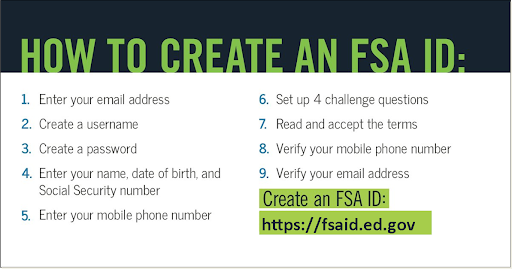
  1. Create a Federal Student Aid account (FSA ID).

IMPORTANT: Some of the most common FAFSA errors occur when the student and parent mix up their FSA IDs. If you don’t want your financial aid to be delayed, it’s extremely important that each parent and each student create his or her own FSA ID and that they do not share it with ANYONE, even each other.

  1. Start the FAFSA® – Free Application for Federal Student Aid form at gov.

Go to fafsa.gov or click on the button below to get started.


TIP: To simplify the FAFSA application process, we recommend students begin by following the instructions provided below. For more guidance, check out additional tips from the Department of Education through this example links: Pro Tips for the FAFSA.  Additionally, a helpful  YouTube video is available to walk you through the steps for completing the new FAFSA: How to Submit a FAFSA.

  • If you are the student: Click “Enter your (the student’s) FSA ID.” Then enter your FSA ID username and password and click “Next.”
  • If you are the parent: Click “Enter the student’s information.” Then provide the student’s name, Social Security number, and date of birth, and click “Next.”


Choose which FAFSA form you’d like to complete:

  • The FAFSA school year runs from July 1stto June 30th.

Remember, the FAFSA form is not a one-time thing. You must complete a FAFSA form for each school year.

Create a save key.

  • The save key is a temporary password that allows you and your parent(s) to “pass” the FAFSA form back and forth. It also allows you to save the FAFSA form and return to it later. This is especially helpful if you and your parent are not in the same place.
  1. Fill out the Student Demographics section.

Parents: Remember that the FAFSA form is the student’s application, not yours. When the FAFSA form says “you” or “your,” it’s referring to the student. Pay attention to whether you’re being asked for student or parent information. When in doubt, the banner on the left side will indicate whether you’re on a student or parent page.

  1. Add our school to your FAFSA.

In the School Selection section, add Code 031583 for Cape Coral Technical College.

  1. Answer the dependency status questions.

The dependency guidelines are set by Congress and are different from those used by the Internal Revenue Service (IRS). Even if you live on your own, support yourself, and file taxes on your own, you may still be considered a dependent student for federal student aid purposes. If you are determined to be a dependent student, you’ll be required to report information about your parent(s). If you’re determined to be an independent student, you won’t have to provide parent information but may have to provide spousal information if applicable.

  1. Fill out the Contributor’s section.

It doesn’t matter if you don’t live with your parent(s); you still must report information about them if you were determined to be a dependent.

Start by figuring out who counts as your parent on the FAFSA form.

  1. Supply your financial information.

The Financial Aid Direct Data Exchange, replacing the IRS Data Retrieval Tool starting with the most current year FAFSA form, will transfer contributors’ federal tax information from the IRS directly into your FAFSA form.  All contributors must provide consent and approval. Without consent you will not be approved for Financial Aid.

  1. Sign and submit your FAFSA form.

You’re not finished with the FAFSA form until you (and your parent if you’re a dependent student) sign it. The quickest and easiest way to sign your FAFSA form is online with your FSA ID.

Sign and Submit Tips:

  • If you or your parent forgot your FSA ID, you can retrieve the FSA ID.
  • Make sure you and your parent don’t mix up your FSA IDs.This is one of the most common errors we see, and why it’s extremely important for each person to create his or her own FSA ID and not share it with anyone.
  • Make sure the parent who is using his or her FSA ID to sign the FAFSA form chooses the right parent number from the drop-down menu. If your parent doesn’t remember whether he or she was listed as Parent 1 or Parent 2, he or she can go back to the parent demographics section to check.
  • Here’s what you should do if you get an error saying that your FSA ID information doesn’t match the information provided on the FAFSA form.
  • If you have siblings, your parent can use the same FSA ID to sign FAFSA forms for all his or her children. Your parent can also transfer his or her information into your sibling’s application by choosing the option provided on the FAFSA confirmation page.
  • We recommend signing the FAFSA form with an FSA ID because it’s the fastest way to get your FAFSA form processed. However, if you and/or your parent are unable to sign the FAFSA form electronically with an FSA ID, you can mail in a signature page. From the sign and submit page, select “Other options to sign and submit” and then choose “Print A Signature Page.” Just keep in mind that your FAFSA form will take longer to process if you go this route.
  1. I’m finished. What’s next?

Congrats on finishing! You’re one step closer to getting money for college.

You will receive an email from the United States Department of Education telling you they have processed your Free Application for Federal Student Aid form on their end. It will let you know if you need to make any changes and what steps you need to take. Please READ this and follow the steps! You are not guaranteed any aid yet. You must comply with the instructions.

Once your application is submitted error-free, it will be sent to the Financial Aid Office. (Please note: It may take up to 5 days for the Financial Aid Office to receive your application after submission.) Once you are officially enrolled in the program’s class roster, we will begin processing your financial aid.

Professional Judgment

The Higher Education Act of 1965 (HEA), as amended, combined with the FAFSA Simplification Act provides the authority for financial aid specialists to exercise discretion in certain areas when a student has special or unusual circumstances. This authority is known as Professional Judgement (PJ) and may be exercised on a case-by-case basis.  Please contact the Financial Aid office for more information.

Sponsorship

CareerSource Southwest Florida offers funding for tuition, books, uniforms, and tools to those who qualify. Students must be enrolled in an eligible program and meet the requirements set forth by the organization. CCTC staff members are unable to make any final determinations on student eligibility for Workforce funding. All questions and concerns can be answered by the organization at (239) 931-8200 or (800) 557-3242.

Scholarships

Federal School Code: 031583

Have questions? Contact us or call (239) 574-4440.